I am testing how many users my laptop can handle, and in Part 1 we discussed all the limits that come along the way from 0 to 1000 users all the possible pitfalls, now here I will put our discussion to test and move towards next layer of 1000 to 10000 users.
I’m starting at 1000 virtual users at the system. The setup has two .NET APIs one is compute-only, it calculates age when you pass a birthdate. The other hits Postgres, fetching a value by key. The database has integer keys between 1 and 1000, each mapped to a random GUID, and that’s what the API returns.
Database is configured at 200 max connections. Load is generated with k6, the .NET APIs are running under a profiler, and the machine is 16GB RAM, 8-core CPU.
Testing with 1000 virtual users
I am testing it in 3 scenarios to see what are the bottlenecks we will encounter,
- Local Date Api, Just compute only everything is local the client and server, this is to see the capability of CPU and memory
- Local Fetch Api with Database call: this is to see what happens when DB is involved
- Remote Fetch Api with Database call: this is to see when network is involved
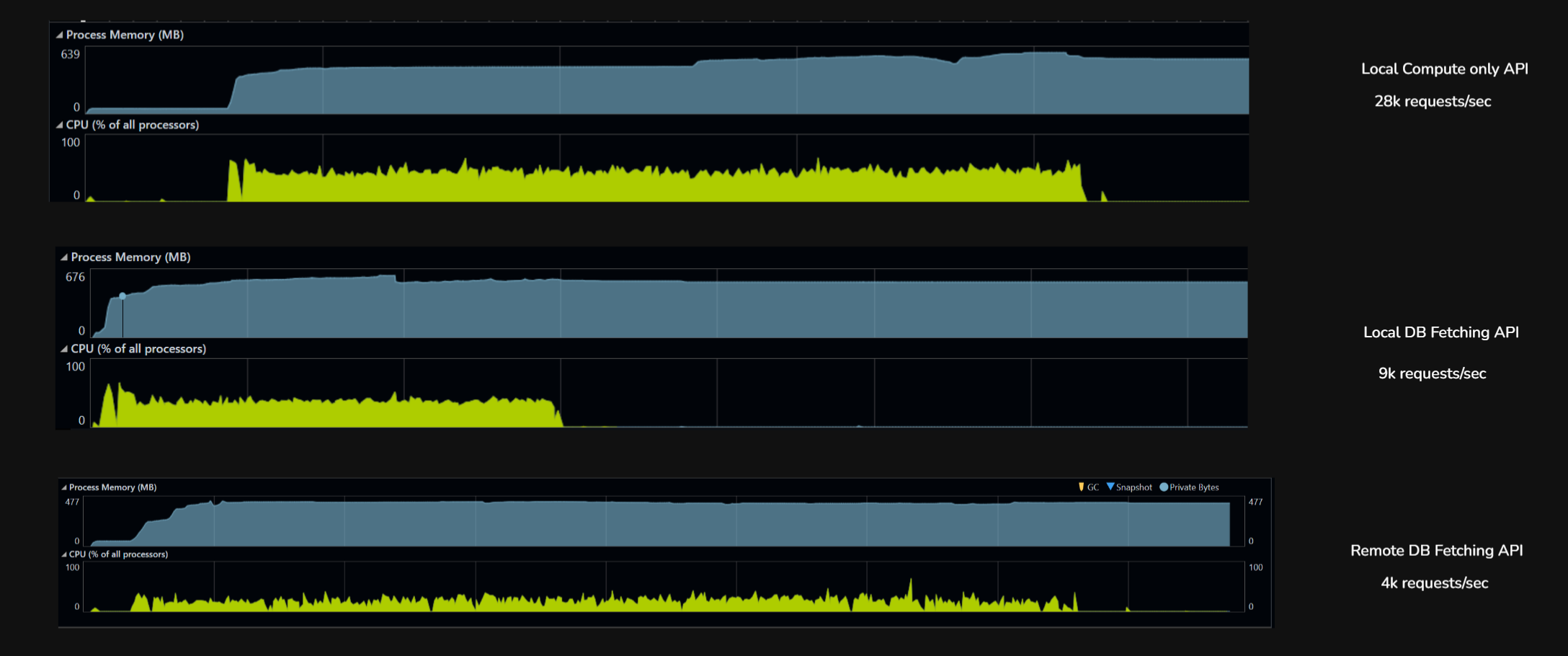
| Metric | Local, no DB (GetAge) |
Local, with DB (FetchUUID) |
Remote, with DB (FetchUUID) |
|---|---|---|---|
| Throughput (rps) | 28,807 | 9,326 | 4,584 |
| Total requests (6 min) | 10,370,595 | 3,357,423 | 1,650,602 |
| p50 latency | 19 ms | 53 ms | 123 ms |
| p95 latency | 35 ms | 113 ms | 251 ms |
| p99 latency | 50 ms | 296 ms | ~310 ms |
| Max latency | 2.3 s | 15.7 s | 5.7 s |
| Failures | 0 | 55 (0.002%) | 2 (0.0001%) |
| Bottleneck | Kernel + Kestrel | Postgres + connection pool | Wi-Fi network |
Local, no DB (28,807 rps). k6 and the .NET app on the same machine, endpoint does pure CPU work (date math). Nothing to wait on. The only limit is how fast the kernel can shovel HTTP requests through Kestrel. Latency is tight (p50 to p99 spread is only 2.5x), almost no tail. This is the server’s true ceiling when nothing external is in the way.
Local, with DB (9,326 rps). Same setup, but the endpoint now hits Postgres for every request. Throughput drops 3x because each request now waits on a connection from the pool, executes SQL, and parses a row. The 15.7-second max latency is requests stuck in the connection pool queue when all 200 connections are busy. The bottleneck moved from the kernel to the database stack.
Remote, with DB (4,584 rps). Same DB endpoint, but k6 now runs on a separate laptop hitting the server over Wi-Fi. Throughput drops another 2x but the DB is no longer the bottleneck. The network is. Median latency jumps to 123ms (almost entirely Wi-Fi round-trip), and the server sits idle most of the time waiting for the next packet. The DB stack could handle far more load; the network just won’t deliver it.
The three runs show how performance bottlenecks are layered and how each one hides the next. On localhost with no I/O, the server hit its true CPU ceiling at 28K rps. Add a database call, and the ceiling drops to 9K rps because the connection pool and Postgres become the slowest link. Move the client across a Wi-Fi network, and the ceiling drops again to 4.5K rps but now the database isn’t the bottleneck anymore, the network is. The same DB code that looked like the problem in run two is invisible in run three, because something even slower sits in front of it. This concludes: optimizing any layer is pointless until we have identified the bottleneck.
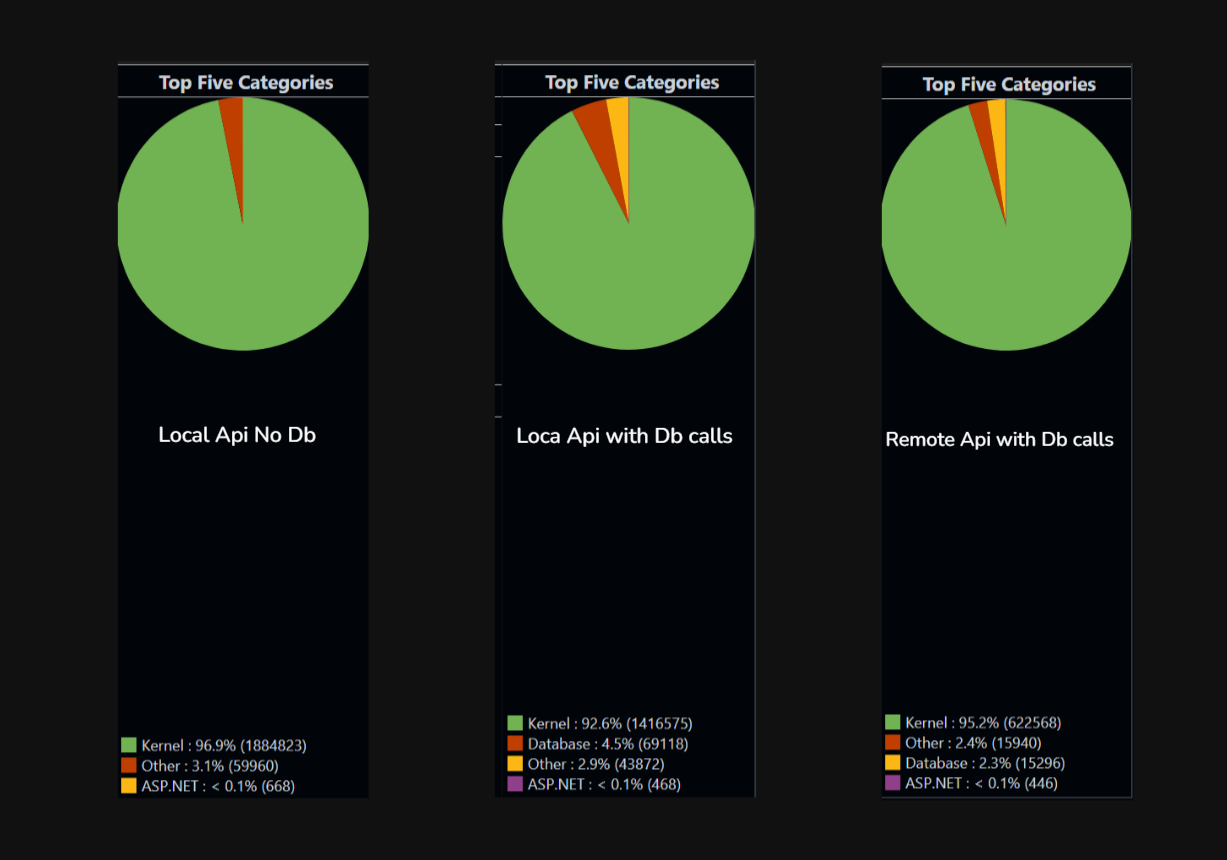
API isn’t doing much, the real work is at the kernel level. Serving incoming HTTP requests, establishing the TCP connection, reading bytes off the socket, putting in accept queue, writing the response, pushing bytes back out. That’s hundreds of syscalls just to move my HTTP traffic in and out.
Now let’s jump to the next layer. I’ll keep one rule throughout: p90 < 500ms. I know that’s generous, but this is a local machine and everything from server to client and database all are here.
Layer 3 : 1000 to 10000
Database connection pool now 300 connection max and now let’s go to 5k users first to see if my PC can reach 10k users
| Metric | This 5K (gradual ramp) |
|---|---|
| Throughput | 2,717 rps |
| Total requests | 2,608,544 |
| p50 latency | 460 ms |
| p95 latency | 4.45 s |
| p99 latency | 6.41 s |
| Max latency | 15.8 s |
| Avg latency | 1,100 ms |
| Failures | 0 |
Wi-Fi-bottlenecked system can do 2.7K rps with ~500ms median latency and a 5-second p95. That’s the real number.
Since we discovered network as our bottleneck at 5000 users where throughput was stuck at 2,717 requests/sec.
| Metric | 1K VUs (Wi-Fi) | 5K VUs (Wi-Fi) |
|---|---|---|
| Throughput | 4,584 rps | 2,717 rps ↓ |
| p50 | 123ms | 460ms |
| p95 | 251ms | 4.45s ↓↓ |
| Max | 5.7s | 15.8s |
| I got 40% less throughput. This is the signature of a saturated system the Wi-Fi link couldn’t absorb 5K VUs, so packets queued, retransmitted, collided, and effective throughput collapsed |
Here I am bringing client back to local device to eliminate that and see what else blocks the target to reach 10000 concurrent users.
Now on local machine client at 5000 virtual users.

Local client at 7000 virtual users.
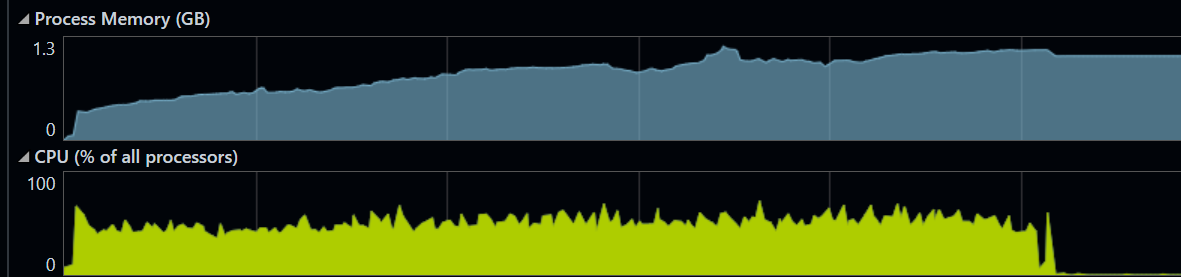
| Test | VUs | Throughput | p50 | p95 | p99 | Max | Failures |
|---|---|---|---|---|---|---|---|
| DB local | 1,000 | 9,326 rps | 53ms | 113ms | 296ms | 15.7s | 55 |
| DB local | 5,000 | 14,906 rps | 172ms | 365ms | 527ms | 2.45s | 0 |
| DB local | 7,500 | 14,228 rps | 263ms | 505ms | 673ms | 2.18s | 0 |
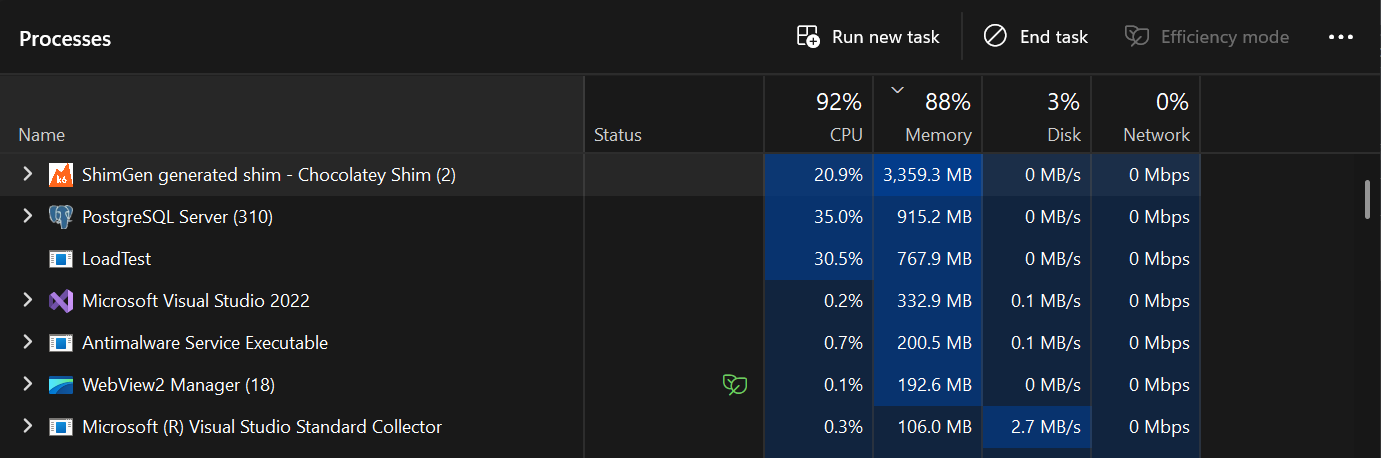
Snapshot of Task Manager at 5k virtual users
The system is now in a state where:
-
Connection pool is constantly saturated, every request waits for a connection
-
CPU is being shared between k6 (driving load), .NET app (handling requests), and Postgres (executing queries) on the same machine
-
k6 itself is probably using 4-6 GB of memory and significant CPU for 7500 VUs
-
No headroom left ,adding more load just creates queue depth, not more work The fact that throughput slightly decreased tells you all three contenders (k6, app, DB) are now fighting for resources. Each gets less than they would in isolation.
-
15K rps is the DB stack’s true ceiling on this hardware
-
5K VUs is the optimal load point peak throughput at lowest possible latency for my PC.
the most important thing across all these tests:
Adding more load to a saturated system makes it slower, not faster. The intuition that “more users = more throughput” only holds below the knee of the curve. Above it, throughput is flat or declining while latency explodes. Production systems hit this exact pattern during traffic spikes
| Test | VUs | Throughput | p50 | p95 | p99 |
|---|---|---|---|---|---|
| GetAge local | 1,000 | 28,807 rps | 19ms | 35ms | 50ms |
| GetAge local | 7,500 | 28,871 rps | 40ms | 160ms | 331ms |
| DB local | 5,000 | 14,906 rps | 172ms | 365ms | 527ms |
| DB local | 7,500 | 14,228 rps | 263ms | 505ms | 673ms |
This is the cleanest possible result that my system has hit the server’s true CPU ceiling for this workload. With pure CPU work and no I/O wait, the server can do exactly ~29K rps and no more it doesn’t matter if we throw 1000 or 7500 VUs at it. The CPU is fully saturated either way.
The only difference between the two runs is latency: at 1K VUs, requests fly through (50ms p99); at 7.5K VUs, they queue (331ms p99). Same throughput, different waiting time.
HTTP keep-alive saves us from port exhaustion at this scale. Each VU keeps one TCP connection open and reuses it for thousands of requests, instead of opening a new connection per request. The 7500 VUs only need ~7500 ports, not 36 million.
How to reach 10k and beyond
The first step is putting k6 on a separate machine, ideally connected via wired Ethernet rather than Wi-Fi. This single change eliminates the CPU contention we kept seeing in the local tests. k6, the .NET app, and Postgres all fighting for the same cores. With that contention gone, the same server hardware that capped at 14K rps would comfortably push past 22K rps, and 10K concurrent VUs becomes trivially achievable. The bottleneck stops being “this laptop is doing too much” and starts being something we can actually optimize.
Past that point, the constraints shift to the layers we haven’t touched yet. Postgres will need more memory to support a larger connection pool each connection costs 2 MB to 10 MB on the server side, so growing from 100 to 300 connections means another ~1 to 2GB just for backend processes, the .NET server will need more memory too, both for the thread pool growing under load and for the in-flight request/response buffers that pile up when concurrency rises.
Eventually the system will hit ephemeral port exhaustion the OS only has ~28K ports available by default for outgoing connections, so a load generator opening short-lived connections will run out and start failing.
I can add Redis to bypass hot reads from db but again, more memory on same machine, redis if not configured will increase latency as well
All of this still lives on one server. We’re intentionally not touching distributed systems here, no horizontal scaling, no load balancer across multiple machines, no replicated database because the single-machine ceiling is already in the hundreds of thousands of requests per second once each layer is properly tuned, and most real applications with 1000s of users never need more than that. Distributed systems solve a fundamentally different problem (fault tolerance, geographic distribution, scale beyond one machine), and they introduce their own complexity that deserves its own discussion. For now, the takeaway is that a single well tuned server can handle far more than people assume and the path from 10K to 100K rps is just systematically removing the next bottleneck identified on the way, one layer at a time
Thanks for reading.
Feel free to connect with me on (rahuldsoni2001@gmail.com)